

- Home
- IVD
- By Technology Types
- By Diseases Types
- By Product Types
- Research
- Resource
- Distributors
- Company
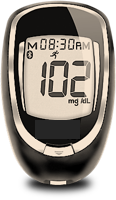
This is a simple and accurate method for testing whole blood glucose (blood sugar) levels that can be used anytime, anywhere. The self-monitoring blood glucose system is designed to quantitatively measure glucose (sugar) levels in fresh capillary whole blood samples collected from the fingertip or forearm. The self-monitoring blood glucose system is intended for use by a single person only; do not share it with others. This self-monitoring system is intended for in vitro diagnostic self-testing by people with diabetes at home as an aid in monitoring diabetes control. It must not be used for the diagnosis or screening of diabetes, nor should it be used on newborns. Testing at alternative sites should only be performed during a steady-state period (when blood glucose levels are not changing rapidly).
| Control Solution | 1.Check dates on control solution label and test strip vial label. Do not use control solution or test strips if expiration dates have passed. 2.Allow control solution, vial of test strips and meter to adjust to room temperature. Write date first opened on both control solution bottle label and test strip vial label when using for the first time. 3.Gently swirl or invert control solution bottle to mix. DO NOT SHAKE! 4.Remove one test strip from vial. Close test strip vial immediately. Use test strip quickly after removal from vial 5.Insert test strip into Test Port. Meter turns on. 6.Wait until Drop Symbol appears in Display. Keep test strip in meter until testing is finished. 7.With cap removed, turn control solution bottle upside down. Squeeze one drop of control solution onto a clean tissue. Wipe off bottle tip and discard tissue. 8.Gently squeeze a drop of control solution onto a small piece of unused aluminum foil or clear plastic wrap. Dispose after use. 9.With test strip still in meter, touch Sample Tip of test strip to top of drop of control solution. Allow drop to be drawn into test strip. Remove test strip from drop when meter beeps. 10.Dashes appear across the Display to show meter is testing. 11.Compare meter result to Control Test range printed on test strip vial label for level of control solution you are using. If result is in range, System can be used for testing blood. If result does not fall within range or meter displays "Lo" or "Hi", repeat test using a new test strip. 12.After result is shown, Strip Release Button flashes. Hold meter with test strip pointing down. Press Strip Release Button to release and discard test strip into appropriate container. Meter turns off. |
| Blood | 1.Check Meter time and date before each glucose test. With meter off, press and hold the “ • ” Button until the full Display is shown and a series of beeps sound. Release “ • ” Button. If time and date are incorrect, see Meter Set Up to set the correct time and date. 2.Check dates on test strip vial being used. Do not use if either the open vial expiration date or the date printed next to EXP on vial label has passed, whichever comes first. 3.Clean and disinfect fingertip (or forearm for alternative site testing). 4.Remove one test strip from vial. Close vial immediately. Use test strips quickly after removal from vial. 5.With meter off, insert test strip Contact End (blocks facing up) into Test Port. Meter turns on. Keep test strip in meter until testing is finished. To mark test as alternative site (forearm) result, press “ ▶ ” Button. ALT Symbol appears in Display. Press “ ◀ ” Button to remove ALT Symbol. Wait until Drop Symbol appears in Display. 6.Lance fingertip or forearm. Allow drop to form. 7.With test strip still in meter, touch Sample Tip of test strip to top of blood drop and allow blood to be drawn into test strip. Remove test strip from blood drop immediately after the meter beeps and dashes appear across the Display 8.After the test is finished, result is displayed. The Strip Release Button flashes. To mark the result with an Event Tag, make sure that Event Tags are turned on (see Set Event Tags, Ketone Alert and Test Reminders). The Event Tag icons flash. Press "▶" or "◀" Button to go to the correct Event Tag. Press “ • ” Button to mark the test result with an event (icon stops flashing). 9.Hold meter with test strip pointing down. Press test strip Release Button to discard test strip in the appropriate container. Meter turns off. Result is stored in Memory with date and time. |
| Test Sample | Fresh apillary whole blood from the finger or forearm, or control solution |
| Result Range | 20-600 mg/dL |
| Sample Size | 0.5 µL |
| Test Time | 4 seconds |
| Result Value | Plasma values |
| Assay Method | Amperometric |
| Power Supply | One 3V lithium battery |
| Battery Life | Approximately 1000 tests or 1 year |
| Automatic Shut-off | After two minutes of non-use |
| Weight | 1.66 ounces |
| Size | 3.44” x 2.16” x 0.69” |
| Memory Size | 500 glucose results |
|
There is no product in your cart. |
Copyright © 2026 Alta DiagnoTech. All rights reserved.